Disclosure: some links in this guide are affiliate links, so I may earn a commission if you buy through them, at no extra cost to you. As an Amazon Associate I earn from qualifying purchases.
You don’t need a spare room or a big budget to set up a home office for your home-based business. You need a quiet spot, a chair that doesn’t hurt, a screen at the right height, a reliable connection and a way to stop work from spilling into the rest of your home. This guide covers 10 steps in the order that matters, with a budget table for three levels of setup and the tax rule to know before you buy anything.
How to Set Up a Home Office in 10 Steps
- Pick one spot and use it only for work.
- Make your internet reliable, wired if you can.
- Choose a desk that fits the space and your work.
- Buy the best chair you can afford and adjust it properly.
- Raise your screen to eye level.
- Fix your lighting so light comes from the side, not behind the screen.
- Upgrade audio and video for client calls.
- Add storage and tidy the cables.
- Back up your files and secure your accounts.
- Set work hours and boundaries.
Home Office Setup Costs: Basic, Mid-Range and Premium
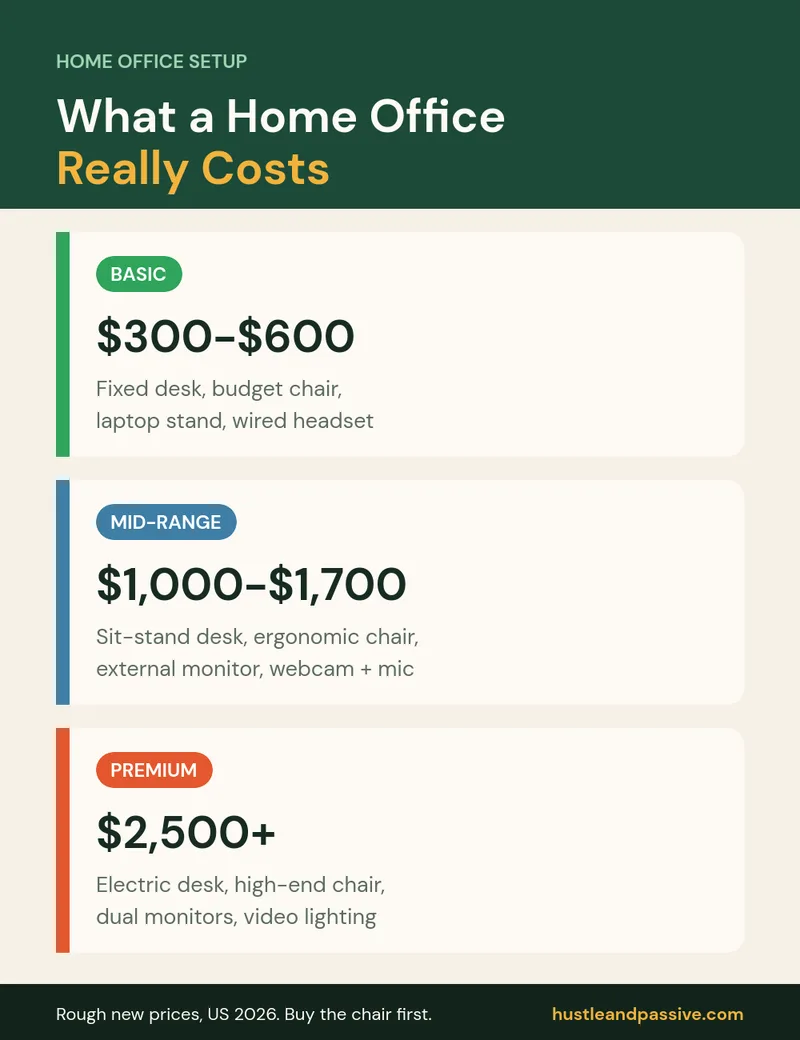
These are rough price ranges for new items in the US in 2026. Buying used furniture, especially office chairs and desks, can cut the cost a lot. Start with the basic column and upgrade the item that bothers you most first, which is usually the chair.
| Item | Basic | Mid-range | Premium |
|---|---|---|---|
| Desk | $80–$150 fixed desk | $250–$450 sit-stand desk | $500+ large electric sit-stand |
| Chair | $100–$200 | $250–$450 adjustable ergonomic | $800+ high-end ergonomic |
| Screen | $30 laptop stand + keyboard and mouse | $150–$300 external monitor | $500+ dual or 4K monitors |
| Lighting | $25 desk lamp | $60–$120 light bar or key light | $150+ lighting kit for video |
| Calls | $30 wired headset | $100–$200 webcam and USB microphone | $300+ creator audio and video |
| Storage and cables | $30 | $80 | $200+ |
| Rough total | About $300–$600 | About $1,000–$1,700 | $2,500+ |
Step 1: Pick One Spot and Keep It for Work
The first decision when you set up a home office is where it goes. A dedicated corner beats a nicer room you share with the rest of the house. Choose a spot with the least foot traffic and noise, near a window if possible, and with a door if you take client calls. Using the same place every day also helps your brain switch into work mode.
If you’re self-employed in the US, a space used regularly and exclusively for your business may qualify for the home office deduction (more on that below). A dining table you clear every evening usually won’t.
Step 2: Make Your Internet Reliable
Dropped calls cost you more than a slow download. Place your router close to your desk or run an Ethernet cable to your computer for the most stable connection. If cables aren’t practical, a mesh Wi-Fi system helps in larger homes. Keep your phone’s hotspot as a backup for important calls.
Step 3: Choose a Desk That Fits Your Work
Measure your space first. Most people need a desk at least about 120 cm (47 inches) wide to fit a monitor, a laptop and a notebook. If you’ll sit for long hours, a sit-stand desk lets you change position through the day. Makers and sellers may need a second surface for packing or crafting, which can be a simple folding table.
Step 4: Get a Good Chair and Adjust It
The chair is the one item worth stretching your budget for. Look for adjustable seat height, lumbar support, adjustable armrests and a seat depth that leaves a small gap behind your knees. A good ergonomic office chair only helps if you set it up: feet flat on the floor or on a footrest, knees roughly level with your hips, and elbows close to a right angle when typing.
Step 5: Put Your Screen at Eye Level
Looking down at a laptop all day strains your neck. According to OSHA’s workstation guidance, the top of your screen should be at or slightly below eye level, and the screen should be about 20 to 40 inches (50 to 100 cm) from your eyes. The cheapest fix is a laptop stand with a separate keyboard and mouse; the bigger upgrade is an external monitor, which also gives you more room to work.
Step 6: Fix Your Lighting
Put your desk so windows are to the side of your screen, not directly behind or in front of it, to reduce glare. Add a desk lamp for evening work. If you’re on video calls often, a small light in front of you, slightly above eye level, makes a bigger difference to how you look on camera than an expensive webcam.
Step 7: Upgrade Audio and Video for Client Calls
Clients forgive a plain background, but not bad audio. In order of impact:
- A USB headset with a microphone: the cheapest big improvement, and it stops echo.
- A 1080p webcam if your laptop camera is poor.
- A USB microphone if you record videos, podcasts or voice-overs.
- Soft furnishings like a rug, curtains or a bookshelf, which reduce echo for free.
Step 8: Add Storage and Tidy the Cables
Clutter on your desk slows you down. Use a small drawer unit or file cabinet for paperwork and a cable management tray under the desk. Plug everything into a surge protector to protect your equipment. If you sell physical products, keep packing supplies in a separate area; our guide to shipping supplies for small business covers what you need.
Step 9: Back Up Your Files and Secure Your Accounts
Your computer is your business. Protect it with three habits:
- Back up automatically to a cloud service and to an external drive, so one failure never loses client work.
- Use a password manager and turn on two-factor authentication for email, banking and client accounts.
- Keep work and personal accounts separate, including a separate business email and bank account.
Step 10: Set Work Hours and Boundaries
The hardest part of any home office setup isn’t the furniture. Set regular hours, tell the people you live with when you can’t be interrupted, and shut the laptop or leave the room at the end of the day. If you work around a day job, block the same two or three time slots each week so your side business gets consistent attention.
The Home Office Tax Deduction (US)
If you’re self-employed, the IRS lets you deduct the business use of your home if you use part of it regularly and exclusively for business and it’s your principal place of business, according to the IRS home office deduction page. The simplified method uses a set rate per square foot of your office, up to 300 square feet, while the regular method uses a share of your actual home expenses. Equipment like desks, chairs and computers is usually deducted as a separate business expense. This is general information, not tax advice; check IRS Publication 587 or a tax professional for your situation.
Home Office Extras by Type of Home-Based Business
| Business type | Extra to prioritize | Related guide |
|---|---|---|
| Virtual assistant or freelancer | Headset, second monitor, calendar and time-tracking tools | Virtual assistant tools |
| Online seller or maker | Packing table, shipping scale, label printer | Shipping supplies |
| Content creator or YouTuber | Microphone, lighting, quiet room | Remote side hustles |
| Service business with visiting clients | Separate entrance or tidy meeting area, zoning check | Home-based businesses |
Home Office Setup FAQ
How much does it cost to set up a home office?
A basic home office setup costs roughly $300 to $600 if you buy new, mostly for a chair, a desk, a laptop stand and a headset. A mid-range setup with a sit-stand desk and an external monitor runs about $1,000 to $1,700. Buying used furniture can cut these costs significantly.
What is the most important item in a home office?
A good, properly adjusted chair, followed by getting your screen to eye level. These two affect your comfort every single working hour.
Can I set up a home office without a spare room?
Yes. A quiet corner of a bedroom or living room works if you keep it only for work, use a room divider or shelf to separate it, and put everything away at the end of the day.
Can I deduct my home office on my taxes?
In the US, self-employed people may deduct a home office used regularly and exclusively for business that is their principal place of business. Check the IRS rules or ask a tax professional before you claim it.
Where should I put my desk in my home office?
With the window to the side of your screen to avoid glare, away from the busiest part of the house, and close enough to the router or an Ethernet port for a stable connection.
Your Next Step
Start with the spot, the chair and the screen height this week; they matter more than anything you can buy later. Still choosing what to run from your new office? See our list of home-based businesses and the best business ideas for 2026.
Deciding which business to start from home? My Side Hustle Idea Validator ($9) scores each idea on demand, competition and startup cost, and the free 50 AI Side Hustle Ideas list gives you fifty to start from.

Writes and tests every guide on hustle&passive. Everything here is something we have actually run — including the parts that did not work.