Disclosure: some links below are affiliate links. If you sign up through one, I may earn a commission at no extra cost to you. I only list tools I’d put in my own stack.
Most lists of the best virtual assistant tools have the same problem: they name ten apps and never tell you what any of them cost. That’s the one thing you actually need, because when you’re starting out as a virtual assistant your software budget is somewhere between zero and forty dollars a month, and a list that recommends four tools at $20/seat is useless to you.
So this list of the best virtual assistant tools is built the other way round. Every tool below has its current 2026 price attached, the free tier spelled out with its real limits, and an honest note on whether the paid version is worth it in your first year. At the end there’s a stack that costs nothing at all, which is where I’d tell almost anyone to start.
TL;DR: the short version
- You can run a full VA business on $0/month using free virtual assistant tools: Kit, HubSpot’s free CRM, ClickUp Free, Toggl Free, Wave and Fathom Free. The free tiers in 2026 are genuinely good, not crippled trials.
- The first tool worth paying for is scheduling, not project management. Calendly Standard at $10/seat/month removes more admin friction per dollar than anything else on this list.
- Asana’s free plan caps at 2 users. ClickUp Free doesn’t cap members at all, which matters the moment a client wants a login.
- AI meeting notes is the one genuinely new category since 2025. Fathom’s free tier gives unlimited recordings and transcriptions, and it changes what you can charge for.
- Skip Hootsuite. Social scheduling is the most overpriced category in this space relative to what free alternatives do.
How I picked the best virtual assistant tools
Three filters, in order.
First, the free tier has to be usable for real client work, not a 14-day trial wearing a disguise. Second, the tool has to be one clients already recognise, because half of your job is fitting into systems they’ve already chosen. Third, it has to still make sense when you have six clients instead of one. Tools that break at scale are worse than no tool, since migrating client data mid-contract is exactly the kind of unpaid weekend you got into this to avoid.
If you’re still deciding whether this career is for you, start with the step-by-step guide to becoming a VA with no experience and come back here once you’ve got a first client to organise.
1. ClickUp: project management without the seat limit
Free Forever: $0 with unlimited members. Unlimited: $7/user/month annually, $10 monthly.
I’ve flipped on this one since the last version of this article. Asana used to be the default recommendation, and it is still the more polished product. But Asana’s Personal plan caps you at two users, and a solo VA plus one client is two users. Add a second client and you’re paying $10.99/user/month before you’ve earned anything.
ClickUp’s Free Forever plan has unlimited tasks and, more importantly, unlimited members. You get board and calendar views, in-app video recording (genuinely useful for sending a client a two-minute walkthrough instead of writing five paragraphs), and 60MB of storage. The storage cap is the real limit, and it’s the reason you keep files in Drive and links in ClickUp.
The interface is busier than Asana’s. Budget an afternoon to set up one client template properly, then clone it for every new client after that.
Worth paying for? Not in year one. Unlimited at $7/user/month annually is fair once you need unlimited storage and Gantt charts, but that’s a year-two problem.
2. Slack: where client work actually happens
Free: $0, 90 days of message history. Pro: $7.25/user/month annually, $8.75 monthly.
You will almost never buy Slack. Clients buy Slack, and they invite you to their workspace as a guest. That’s the normal arrangement and it’s why Slack is on this list despite being a cost you probably won’t carry.
What matters for you is the free plan’s 90-day history limit, because if you run your own workspace for your own clients, anything older than three months disappears. For a VA that’s a real risk: the brief a client gave you in March is gone in June. Either keep decisions in your project tool rather than in chat, or accept that Slack is a conversation layer and not a record.
The free tier also caps you at 10 app integrations, which sounds tight and isn’t, in practice, for a solo operator.
3. Toggl Track: time tracking that survives a billing dispute
Free: $0 for up to 5 users. Starter: $9/user/month.
If you bill hourly, this is not optional, and the free tier is generous enough that there’s no excuse. Toggl Track’s free plan covers manual and real-time timers, calendar integrations, and personal reports across web, mobile and desktop.
The reason I keep recommending Toggl over the tracker built into your project tool is the export. When a client questions an invoice (and one eventually will), a Toggl CSV showing 4.2 hours across eleven named entries ends the conversation in about ninety seconds. A vague “time tracked in ClickUp” screenshot does not.
One habit worth building early: name your time entries after the deliverable, not the activity. “Draft October newsletter” reads like work. “Emails” reads like padding, even when it isn’t.
Worth paying for? Only if you need billable-rate settings and invoicing exports, which is roughly the point where you’re earning enough that $9 is noise.
4. Calendly: the first paid tool I’d buy
Free: $0 with one event type. Standard: $10/seat/month, 17% off annually.
Here’s the argument for spending money on scheduling before anything else: every other tool on this list saves you time on work you’re already being paid for. Calendly saves you time on unpaid work, which is the scarce resource when you’re building a client base.
The free plan gives you one event type and one calendar connection. That’s enough to book discovery calls and nothing else. Standard unlocks unlimited event types, which is what you need in practice: a 15-minute intro call, a 30-minute client check-in, a 60-minute onboarding session, each with different buffers and availability.
Standard also now includes Calendly’s Notetaker and its Callie AI assistant, which overlaps with Fathom below. If you’re paying for Calendly Standard, test both before adding a second subscription.
5. Notion: your SOPs, and eventually your product
Free: $0 for individual use. Plus: $10/seat/month.
Every VA hits the same wall around client three: you’re re-explaining the same process for the fourth time and you’ve written it down nowhere. Notion is where you fix that.
The free plan covers individual use with unlimited databases, 7 days of page history, and up to 10 external guests. Ten guests is a meaningful number for a VA, since it means ten clients can view a shared process doc without you paying for seats.
The second-order benefit is the one people miss. Once you have twenty solid SOPs written up, that’s a product. VAs sell Notion client-onboarding templates on Gumroad for $20 to $50 routinely, which is the same move as the digital products play we’ve covered elsewhere on the site, just applied to work you were doing anyway.
6. Fathom: the category that didn’t exist in 2025
Free: $0, unlimited recordings and transcriptions. Premium: $16/month annually, $20 monthly.
This is the one genuinely new thing since I last updated this article, and it’s the tool I’d add first if your stack is otherwise set.
Fathom joins your Zoom, Meet or Teams calls, records, transcribes, and writes a summary. The free plan includes unlimited recordings and transcriptions plus AI summaries and search across calls, which is more than most paid tools offered two years ago. Action-item generation and CRM integration sit behind Premium.
Why it matters commercially: “I’ll send you notes and action items within an hour of every call” is a line you can put in a proposal, and it costs you nothing to deliver. That’s a differentiator against every other VA pitching the same client, and it took me embarrassingly long to realise it was a selling point rather than just a convenience.
Otter and Granola do similar things. Fathom’s free tier is currently the most generous, but check before you commit. This category is moving fast and terms change.
7. Zapier: automation, used sparingly
Free: $0, 100 tasks/month. Professional: from $19.99/month.
Zapier’s free plan gives you 100 tasks a month and single-step Zaps. That’s genuinely enough for a solo VA, and I’d resist upgrading for longer than feels comfortable.
The reason: most VAs automate the wrong thing first. They build an elaborate seven-step Zap for a task they do twice a month, and skip automating the thing they do eleven times a day. Before you buy anything, track a normal week in Toggl and automate whatever shows up most. Usually it’s something boring, like copying form submissions into a spreadsheet.
Multi-step Zaps need Professional at $19.99/month. If you’re doing client-facing automation as a service rather than for your own admin, that’s a business expense you can bill through.
Make is another automation tool worth a look if you outgrow single-step Zaps. I haven’t used it myself, so compare both before you pay for either.
8. Wave: invoicing that stays free
Free: unlimited invoices and bookkeeping. Pro: $19/month. Card payments 2.9% + $0.60.
The old version of this article recommended FreshBooks here, which is a fine product with no free tier. For a VA sending four invoices a month, paying for accounting software is hard to justify.
Wave’s free Starter plan covers unlimited estimates, invoices, bills and bookkeeping records, with online card payments at 2.9% + $0.60 per transaction. Pro at $19/month adds automatic bank imports, receipt capture and late-payment reminders, and drops the per-transaction fee to 2.9% + $0 for your first ten monthly transactions.
Do the arithmetic before upgrading. If you invoice $3,000/month across six card payments, Pro’s fee saving is about $3.60. It isn’t the fees that justify Pro, it’s the automatic bank feed, and only once bookkeeping is eating a real evening each month.
Irregular income is its own problem, separate from invoicing. If that’s biting, the guide to financial planning for gig workers covers the buffer-building side.
9. HubSpot CRM: free, and the one clients already use
Free: $0, up to 1,000 contacts and 2 users. Starter: $7/seat/month annually.
Two reasons this beats a spreadsheet, and neither is the software.
The first is that you stop losing leads. Someone emails you in March asking about availability, you’re full, and you never follow up in May when you aren’t. A CRM with a follow-up date fixes that, and that single habit has probably been worth more to most VAs than any productivity app.
The second is that a lot of small-business clients already run HubSpot. Knowing your way around it is a billable skill, and “I can manage your HubSpot pipeline” is a better line in a proposal than “I’m organised”.
The free CRM covers 1,000 contacts with no time limit and two users, with Gmail and Outlook integration. That ceiling is far above what a solo VA will hit in year one.

Own Your Audience. Build Your List
Social media algorithms can change tomorrow. Your email list is yours forever. HubSpot gives you the tools to capture leads, automate sequences, and turn subscribers into buyers without needing a tech degree.
👉 Start with HubSpot’s free CRM. No card required, and the free tier is a real product rather than a trial.
A CRM only helps once you have leads to put in it. Our guide on where to find virtual assistant clients compares 12 channels by fee, requirements and time to a first client.
10. Kit: email, for you and for your clients
Free: $0 up to 10,000 subscribers. Creator: $33/month. Pro: $66/month.
The previous version of this article put Mailchimp in an “email management” slot, which conflated two different jobs. Managing a client’s inbox is an admin task. Running their newsletter is a marketing service, and it pays better.
Kit (formerly ConvertKit) is the one I’d learn, because its free plan runs to 10,000 subscribers with unlimited landing pages, forms and broadcasts. You can learn the entire tool on a real audience without paying, then charge clients to run theirs.
That’s the actual play here. Newsletter management is a retainer service, typically priced per month rather than per hour, and it’s one of the cleaner routes out of trading time for money. Same logic that makes freelance writing worth building into a career rather than treating it as gig work.
👉 Set up a free Kit account and build your own list first. Practising on your own audience is cheaper than learning on a client’s.
Do you need your own website as a VA?
Short answer: not immediately, but sooner than most people think.
You can land your first two or three clients through Upwork, referrals, or a decent LinkedIn profile. What you can’t do from those channels is control the first impression, and there’s a specific moment where it starts costing you: when a client asks for your rates and you send a Google Doc from a gmail.com address.
A one-page site with your services, a short about section and a Calendly embed does two things. It lets you quote higher without flinching, and it gives you a professional email address at your own domain, which is the part that actually moves the needle in a cold pitch.
You don’t need much. Shared hosting with a free domain for the first year runs a few dollars a month. Hostinger’s Premium plan is $2.99/month promotionally and $10.99 on renewal, with a free domain for the first year, free SSL and two mailboxes.
Host Your Own Storefront for Under $2.99/Month
Skip the marketplace cut entirely. Hostinger runs everything from landing pages to checkout, fast enough to handle a launch spike without falling over.
👉 Get hosting and a domain through Hostinger if you want the professional email address more than the website.
Check the renewal price before you commit, not just the promo rate. That’s true of every host, not just this one.
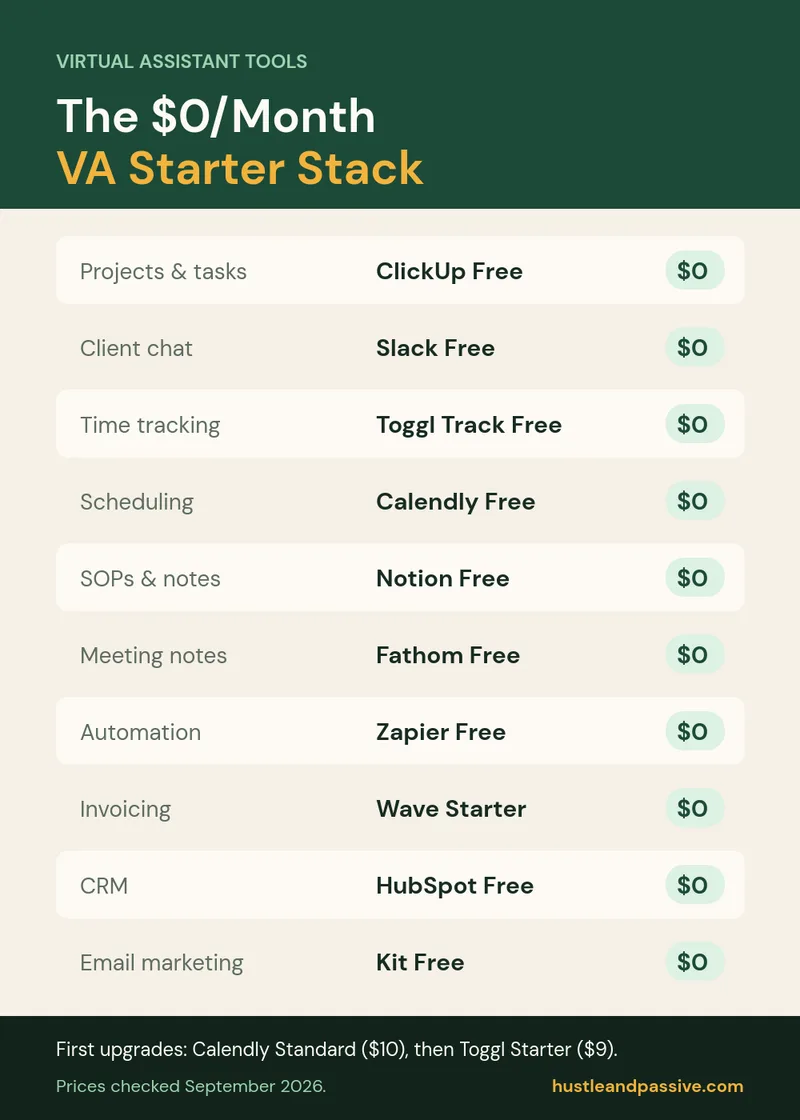
The $0 virtual assistant tools starter stack
If you’re starting this month with no budget, here’s the whole thing:
| Job | Tool | Cost | The catch |
|---|---|---|---|
| Projects & tasks | ClickUp Free Forever | $0 | 60MB storage |
| Client chat | Slack Free | $0 | 90-day history |
| Time tracking | Toggl Track Free | $0 | Up to 5 users |
| Scheduling | Calendly Free | $0 | One event type |
| SOPs & notes | Notion Free | $0 | 10 external guests |
| Meeting notes | Fathom Free | $0 | No action items |
| Automation | Zapier Free | $0 | 100 tasks/month |
| Invoicing | Wave Starter | $0 | 2.9% + $0.60 card fee |
| CRM | HubSpot Free | $0 | 1,000 contacts, 2 users |
| Email marketing | Kit Free | $0 | Single user |
Prices and free-plan limits for these virtual assistant tools were checked on each tool’s pricing page in September 2026. They change often, so confirm before you subscribe.
Total: $0/month.
That stack will carry you to roughly six clients before anything genuinely breaks. When it does break, the first upgrade is Calendly Standard at $10, then Toggl Starter at $9 if you bill hourly. Everything else can wait longer than you’d think.
Virtual assistant tools I’d skip
Hootsuite. Social scheduling is the worst value-per-dollar category here, and Buffer’s free tier or the platforms’ own native schedulers cover most client needs.
Paid AI writing subscriptions, at first. ChatGPT and Claude both have free tiers that handle the drafting a VA typically does. Upgrade when a specific client workflow needs it, not preemptively.
A second project management tool. The most common mistake I see is running ClickUp for yourself and Asana because one client uses it, then a third for another client. Live inside the client’s tool when they have one, and keep exactly one of your own.
FAQ
Which virtual assistant tools do you actually need to start?
Four: a project tool, a time tracker, a scheduler, and a way to invoice. ClickUp, Toggl Track, Calendly and Wave all have free tiers that cover this completely. Everything else on this list solves a problem you don’t have yet in month one.
Can you run a VA business with only free virtual assistant tools?
Yes. As of 2026 the free tiers from ClickUp, Toggl, Notion, Fathom, HubSpot, Kit and Wave cover the full workflow from lead to invoice at $0/month. The limits you’ll hit first are Slack’s 90-day history and ClickUp’s 60MB storage, and both have workarounds.
How much should a VA budget for software per month?
Nothing in month one. Around $20 to $30/month once you have three or four steady clients, which typically means Calendly Standard and Toggl Starter. Above $50/month you should be able to name the specific client revenue each subscription supports.
Which VA tool should I learn first to get hired?
HubSpot or Kit, depending on the clients you want. Small businesses run HubSpot; creators and coaches run Kit. Both are free to learn on, and being able to name a specific platform in a pitch beats listing “excellent organisational skills”.
Is Asana or ClickUp better for virtual assistants?
ClickUp, mainly on pricing structure. Asana’s free plan caps at two users, so a second client pushes you onto a paid plan at $10.99/user/month. ClickUp’s free plan has no member cap. Asana is the nicer product; ClickUp is the one that doesn’t charge you for growing.
Wrapping up: the best virtual assistant tools to start with
The honest summary of 2026 is that the free tiers got good enough that tool cost is no longer a barrier to starting as a VA. What’s changed since 2025 isn’t the project management or the time tracking, it’s AI meeting notes, and Fathom’s free plan is the single highest-leverage addition to a VA stack right now. The rest of the best virtual assistant tools on this list are the same reliable basics they were a year ago.
Start with the $0 stack of free virtual assistant tools. Add Calendly Standard when unpaid scheduling admin starts eating an hour a week. Add nothing else until you can point at the client that pays for it.
If you haven’t landed a first client yet, that’s the actual bottleneck, not your software. The no-experience VA guide covers where to find them, and remote side jobs has adjacent options if VA work turns out not to be the fit.

Writes and tests every guide on hustle&passive. Everything here is something we have actually run — including the parts that did not work.