Disclosure: Some links in this article may be affiliate links. If you purchase through one of these links, we may earn a commission at no additional cost to you.
If you’re building a side hustle, you don’t need 30 AI subscriptions.
You need the right few tools for the job.
Want to test before you pay? Start with our list of free AI tools worth using.
If you are still choosing which AI side hustle to start, my guide on how to make money with AI compares nine options by start cost, time to first dollar and saturation.
The best AI tools for side hustlers in 2026 can help you research ideas, create digital products, write content, design graphics, produce videos, automate repetitive tasks and market what you sell.
If you’re asking which is the best AI to create digital products, the honest answer is that it depends on the product: a writing assistant for ebooks and guides, a design tool for templates and printables, and a video or voice tool for courses. The ranking below compares the AI tools to make digital products by what each one is actually good at, so you only pay for the ones your product needs.
But there’s an important distinction: AI should speed up your work, not replace your judgment.
Your goal isn’t to generate as much content as possible. It’s to use AI to move faster while keeping the research, expertise, editing and decisions that make your product genuinely useful.
I’ve consolidated the older AI-tool guides on Hustle & Passive into this single resource so you don’t have to jump between several nearly identical lists. The previous articles covered writing, design, video, SEO, automation and beginner workflows, but much of that information was written for 2025 and included outdated pricing and tool descriptions.
Below, you’ll find the tools organized by what you’re actually trying to accomplish.
This guide is about which tools to use. If you are still deciding what to make, start with our guide to AI digital products, then come back here to pick your tools. You can also browse the AI tools and guides hub.
Quick Recommendations
Short on time? Here’s the fast answer on the best AI tools for digital products before the full breakdown:
- Best all-around starting stack: ChatGPT or Claude for writing, Canva for design. Covers most of what a new digital product needs, and both have real free tiers.
- Best if you’re already earning and want to scale: Claude or Jasper for content, Keysearch for SEO, Kit for your email list.
- Best single tool to open daily: Canva. It pulls double duty across nearly every product type on this page.
- Most likely to change how you work: Descript, if you’re doing any audio or video. Editing by deleting text instead of scrubbing a timeline is a genuine step-change, not a marginal upgrade.
- Skip for now if you’re just starting out: SEMrush and Surfer SEO. Both are excellent, both are priced for people already making money from content, not for testing an idea.
Full breakdown, verified pricing, and the category-by-category comparison are below.
Best AI Tools for Digital Products, by Product Type
If you already know what you want to sell, start here. These are the AI tools for digital products that do the heavy lifting for each common product type; the full reviews are further down.
Ebooks and guides
Claude or ChatGPT for the outline and first draft, Grammarly for the edit, and Canva for the cover and page layout. Claude handles long documents better; ChatGPT is quicker for brainstorming chapter ideas.
Printables, planners and templates
Canva does most of the work here: layouts, brand kit and template links you can sell. Midjourney adds original artwork so your designs don’t look like everyone else’s. See how to sell Canva templates for the licensing rules.
Online courses
Claude or Jasper for lesson outlines and scripts, Descript to edit recorded lessons by editing the transcript, Synthesia if you would rather not appear on camera, and ElevenLabs for narration.
AI art, prints and stickers
Midjourney for finished artwork and Stable Diffusion if you want more control and run it yourself. Check each tool’s commercial-use terms before you sell, then pick a marketplace from our guide on where to sell AI-generated products.
Audio products
Guided meditations, audiobook samples and podcast intros: ElevenLabs or Murf AI for the voice, Descript for editing.
Selling and marketing what you make
Shopify or Gumroad to sell, Kit to build an email list, and Keysearch to check what buyers are searching for before you build.
Sell Digital Products While You Sleep
Don’t let a clunky checkout process kill your sales. Shopify makes it incredibly easy to sell digital downloads, manage inventory, and get paid whether you are awake or asleep.
What Are AI Tools for Side Hustlers?
AI tools for side hustlers are software applications, most built on large language models or generative image and audio models, that automate work you’d otherwise have to do by hand or pay someone else to do. They learn from existing text, images, audio, and behavior data, then use that to draft, design, edit, or analyze on your behalf.
In practice, that means content generators for blog posts and social captions, design tools that spit out graphics and layouts, video and audio tools for voiceovers and editing, SEO tools that tell you what to write and how to rank for it, and business tools that run your CRM and email list on autopilot while you sleep.
The point isn’t to replace your judgment. It’s to hand off the repetitive 80% of the work so you can spend your limited hours on the 20% that actually needs a human: strategy, taste, and the relationships that make people buy from you specifically.
Why Side Hustlers Need AI Tools
Running a side hustle on top of a full-time job or family life means you’re short on exactly two things: time and specialized skill. AI tools attack both.
Batch-creating content used to eat entire weekends; now it fits into a few evenings. Hiring a copywriter, designer, and video editor for a small digital product line doesn’t pencil out when you’re not sure the product will sell yet, so AI handles the smaller tasks and you save the human budget for work that actually needs one. You don’t need to be a designer or a writer anymore to ship something that looks and reads professionally. And once a workflow is built around these tools, your 10th product genuinely isn’t much harder to produce than your 1st.
None of this means pumping out generic AI slop and hoping it sells. The side hustlers actually making money with these tools in 2026 are the ones using AI to move faster on ideas they’ve already validated, not using it to skip validation altogether.
For a deeper walkthrough of turning that speed into an actual income stream, see our guide to the AI digital products you can create and sell.
Key Considerations: How to Choose the Right AI Tool
With new tools launching monthly, here’s how to filter without wasting a weekend on free trials:
- Define your actual bottleneck. Writing, design, video, or research? Pick the category that’s costing you the most hours this month, not the tool that’s trending on X.
- Check the real cost. Free tiers are usually fine for testing; almost every serious tool on this list becomes worth paying for once you’re shipping regularly. Weigh monthly cost against hours saved, not against the sticker price alone.
- Test the learning curve honestly. If a tool needs a weekend of tutorials before it saves you time, that’s a real cost. Factor it in.
- Confirm it fits your stack. Does it plug into WordPress, Shopify, or whatever you’re already using? A tool that requires you to rebuild your workflow rarely earns that back.
- Read the fine print on usage caps and commercial rights. Several image and video tools on this list restrict commercial use on their cheapest tier. Check before you build a product around one.
- Weigh community and support. When something breaks at 11pm before a launch, an active user community or responsive support beats a beautiful landing page.
- Ask if it’ll still exist in six months. 2026 has already seen a major tool shut down mid-year (more on that below). For anything you’re building a workflow around, that’s now a real question, not a paranoid one.
Compare free vs. paid AI tools if you’re still deciding where to start spending.
The Best AI Tools for Digital Products and Side Hustles, by Category
The tools are grouped into the five categories most side hustlers actually need, plus a dev/product bucket for anyone building something more technical.
Content & Writing
1. Jasper
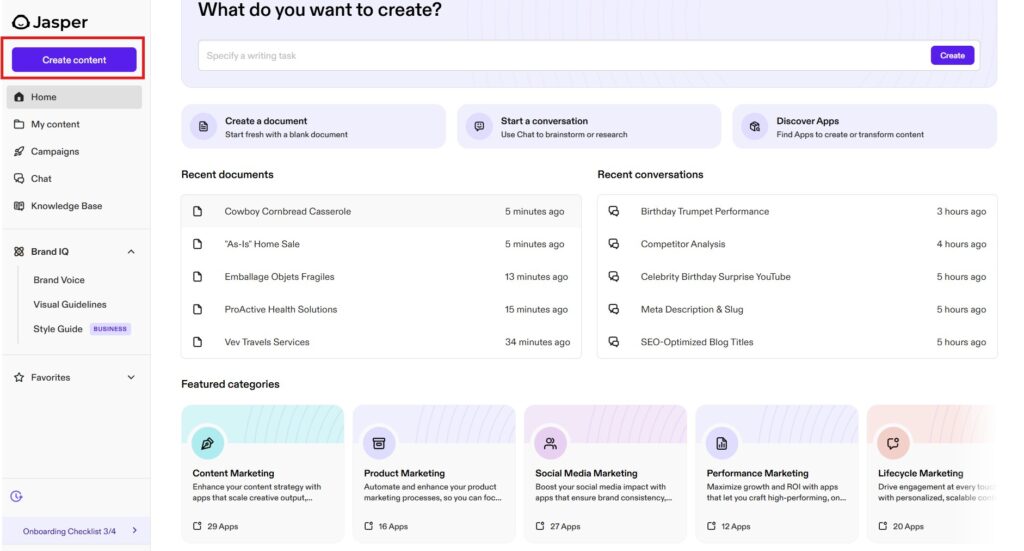
Jasper (formerly Jarvis) remains the most fully-featured long-form writing tool on this list: pre-built templates for blog posts, product descriptions, and sales pages, plus brand-voice controls that keep output on-tone across a team. Note: the old “Boss Mode” feature was discontinued in 2026’s platform overhaul, so don’t reference it if you’ve used Jasper before.
- Best for: long-form blog and marketing content at volume
- Pricing: from $59/month (Pro, billed annually; $69/month billed monthly). No free tier anymore, only a 7-day trial.
- Pros: high-quality output with minimal editing, active user community
- Cons: pricier than it used to be for a solo side hustle; occasional factual slip-ups worth a final review
2. ChatGPT
Still the easiest entry point into AI for anyone who hasn’t used these tools before. No templates to learn, just type what you need.
- Best for: brainstorming, drafting, and general Q&A
- Pricing: free tier / $20/month for Plus
- Pros: minimal learning curve, genuinely versatile
- Cons: free tier hits capacity at peak times; lacks Jasper’s marketing-specific templates
If you want to see how far a ChatGPT-only side hustle can actually go, we’ve broken down real examples in making money with ChatGPT.
3. Claude
The one genuinely new addition to this category for 2026. Claude‘s biggest edge for a side hustle isn’t a flashier interface. It’s that it holds your tone and structure across a full-length draft instead of drifting halfway through, and you can drop an entire brand brief, a competitor’s page, and a stack of customer reviews into one conversation instead of stitching context across tabs.
- Best for: long-form drafts that need to stay on-brand, research synthesis, editing existing writing
- Pricing: free tier / from $20/month for Pro
- Pros: strong long-context handling, follows detailed style rules consistently, output reads less “AI-flavored” out of the box
- Cons: fewer pre-built marketing templates than Jasper; no native image generation, so you’ll still need a design tool alongside it
4. Copy.ai
Built for short-form: ad copy, product descriptions, social captions. Faster to get useful output from than Jasper if long-form isn’t your goal.
- Best for: ads, product descriptions, social copy
- Pricing: from $36/month
- Pros: fast, intuitive, free trial available
- Cons: not built for long-form; quality gets inconsistent on complex briefs
5. Writesonic
Covers blog posts, landing pages, and ad copy in one tool, though it’s repositioned itself in 2026 around AI search visibility (GEO) tracking as much as writing, so expect a more crowded dashboard than a simple writing tool.
- Best for: creators who want writing and basic AI-search-visibility tracking in one place
- Pricing: entry tiers vary a lot by source (roughly $20–$40/month). Writesonic has re-tiered its plans repeatedly, so confirm current pricing on their site before quoting a number.
- Pros: affordable relative to Jasper, multi-language support
- Cons: output can read generic without a solid edit pass; pricing/tier names change often enough to be genuinely confusing
6. Grammarly
Not a generator. A polish layer. Every draft from the tools above should pass through something like this before it ships.
- Best for: grammar, clarity, and tone consistency
- Pricing: free tier / from $12/month for premium
- Pros: near-zero learning curve, catches what generators miss
- Cons: the genuinely useful features (tone detection, plagiarism check) sit behind the paid tier
Design & Visuals
7. Midjourney
The current standard for AI-generated art: book covers, course graphics, social banners, via Discord prompts.
- Best for: original, high-quality visuals
- Pricing: from $10/month
- Pros: distinctive, consistent output; large community for prompt tips
- Cons: Discord-only interface has a learning curve; commercial rights are limited on the cheapest plan
8. DALL·E
OpenAI’s image generator, with a friendlier web interface than Midjourney and more precise prompt-editing controls.
- Best for: quick concept art and fine-tuned edits
- Pricing: pay-per-credit
- Pros: user-friendly, high-resolution output
- Cons: credit system can run dry with heavy use; commercial terms need a careful read
9. Canva
The one design tool most side hustlers end up living in: AI-assisted layouts on top of a massive template library, for everything from ebook covers to Pinterest pins.
- Best for: anyone without design training who needs to look professional fast
- Pricing: free tier / from ~$15/month for Pro (risen from $12.99 over the past couple of years, so check current regional pricing)
- Pros: genuinely intuitive, huge template library, generous free tier
- Cons: the AI-specific features live behind the paid plan, and AI generations are capped by a monthly credit pool even on Pro
If you’re building printables, templates, or any kind of visual digital product, Canva is where I’d start. It’s the one tool on this entire list I still open daily.
10. Stable Diffusion
The open-source alternative to Midjourney and DALL·E. Free, but it asks more of you technically.
- Best for: developers or anyone who wants full control over image generation
- Pricing: free (self-hosted) / paid hosted options available
- Pros: free, fully customizable, constantly evolving
- Cons: real learning curve; output quality depends heavily on your setup
Video & Audio
This category reshuffled more than any other in 2026. See What’s Changed for 2026 below before you build a workflow around any single video tool.
11. Descript
Edit audio or video by editing a text transcript. Delete a sentence, and the corresponding clip disappears. The closest thing to a genuine workflow shift on this list.
- Best for: podcast and course video editing
- Pricing: from $16/month (Hobbyist, billed yearly)
- Pros: dramatically faster than timeline-based editing; Overdub generates voiceovers in your own voice
- Cons: voice cloning requires the Pro tier; deeper features take some ramp-up
12. Synthesia
Turn a script into a polished video with an AI avatar. No camera, no mic, no filming day.
- Best for: sales page explainer videos, training content
- Pricing: from $30/month
- Pros: eliminates the cost of video shoots entirely; wide range of avatars
- Cons: can read as less personal than an actual human on camera
13. Higgsfield
New to this list for 2026, and the direct beneficiary of the Sora shutdown below. Instead of building around one text-to-video model, Higgsfield puts 15+ of them (Veo, Kling, Seedance, and others) behind a single subscription with its own camera-motion presets on top.
- Best for: short-form social video and ads, without betting your whole workflow on one underlying model
- Pricing: from $9–15/month for the starter tier
- Pros: hedges against any single model’s shutdown or price hike; genuinely cinematic camera control
- Cons: credit costs vary by model and get confusing fast; newer and less predictable than the established avatar tools
14. Lumen5
Turns a blog post into a short animated video with stock footage and text overlays, built specifically for repurposing.
- Best for: turning existing blog content into social video
- Pricing: from $19/month
- Pros: genuinely fast content repurposing; no video-editing skill required
- Cons: styles can feel templated; best suited to short clips, not long-form
15. Murf AI
Realistic AI voiceovers across a wide range of accents and languages for slides, training content, or narration.
- Best for: narration and voiceover without hiring a voice actor
- Pricing: from $19/month
- Pros: realistic tone, fast turnaround, flexible commercial rights
- Cons: voice cloning is still in beta; premium voices cost extra
16. ElevenLabs
The tool I actually reach for now when a voiceover needs to sound close to indistinguishable from a real person. The cloning quality is a level above Murf AI, at a comparable price.
- Best for: audiobook-quality narration, multilingual voiceovers, voice cloning
- Pricing: free tier / from $6/month (Starter), scaling with usage
- Pros: best-in-class voice realism; strong multilingual support
- Cons: usage-based pricing can add up on longer projects
If narration quality matters for what you’re building (course intros, audiobook samples, YouTube voiceovers), ElevenLabs is worth the switch from a cheaper tool.
SEO & Content Optimization
17. Surfer SEO
Analyzes top-ranking pages for your target keyword and hands you an actionable structure: word count, headings, keyword usage. Now also surfaces some AI-answer visibility data alongside traditional rank tracking (see the GEO note below).
- Best for: on-page optimization while you write
- Pricing: from $49/month (Discovery, billed yearly); the Standard plan is $99/month
- Pros: detailed, competitive guidelines; integrates with Google Docs and WordPress
- Cons: weighted toward English-language SERPs; easy to over-optimize into keyword stuffing
18. Frase.io
Automates the content-briefing step. It pulls competitor headings, common questions, and key stats into one outline before you write a word.
- Best for: research and brief-building
- Pricing: from ~$15/month
- Pros: saves real research time; combines briefing and writing in one tool
- Cons: gets pricey with multiple seats; still needs a human edit pass
19. SEMrush
A full SEO suite: competitive analysis, keyword tracking, AI-assisted content optimization, for anyone who wants one dashboard instead of five.
- Best for: ongoing SEO strategy across a growing site
- Pricing: from $139/month (SEO plan; $117.33/month billed yearly). Adobe completed its acquisition of Semrush in April 2026, so check the pricing page for any plan changes before you subscribe.
- Pros: genuinely all-in-one; extensive keyword database; now bundles AI-visibility tracking (Semrush One) alongside classic rank tracking
- Cons: overkill (and overpriced) for a single side project
20. Keysearch
The keyword research tool I actually use on this site. Most of the value of the big SEO suites, at a fraction of the cost, without a steep learning curve.
- Best for: keyword research and rank tracking on a solo-creator budget
- Pricing: from $24/month (or ~$20/month billed annually)
- Pros: affordable, straightforward interface, solid keyword-difficulty data
- Cons: thinner competitive-analysis feature set than SEMrush; no dedicated AI-answer tracking yet
If you’re choosing one SEO tool as a solo side hustler, skip the $140/month suite. Keysearch covers the keyword research that actually drives most of the decisions you’ll make.
Find Keywords That Actually Rank
Stop guessing what to write. KeySearch helps you discover low-competition keywords, analyze competitors, and create SEO content that drives long-term organic traffic.
Business, CRM & Automation
21. HubSpot
An AI-assisted CRM and marketing automation platform: lead scoring, campaign tracking, and customer nurturing in one place.
- Best for: side hustles that have grown past a spreadsheet for tracking leads or customers
- Pricing: free CRM / Starter from ~$9–20/seat/month / Professional from ~$45/seat/month. HubSpot’s tiering is genuinely complex (Starter, Professional, and bundled “Suite” pricing all differ), so it’s worth checking their pricing page directly rather than trusting one number.
- Pros: comprehensive, scales well as you grow, actually free at the CRM tier to start on
- Cons: the jump from Starter to Professional is steep; cost climbs fast with advanced features
Once you’ve got actual leads to manage, HubSpot is the one I’d point you to first.

Own Your Audience. Build Your List
Social media algorithms can change tomorrow. Your email list is yours forever. HubSpot gives you the tools to capture leads, automate sequences, and turn subscribers into buyers without needing a tech degree.
22. Zapier
Connects over 3,000 apps into no-code automated workflows. The glue between every other tool on this list.
- Best for: automating the busywork between your other tools
- Pricing: from $19.99/month
- Pros: highly versatile, actually no-code
- Cons: costs climb fast with high-volume automations
23. Monday.com
Project management with AI-assisted automation, useful once you’re juggling more than one product line or launch at a time.
- Best for: managing multiple projects or a small team
- Pricing: from $8/user/month
- Pros: highly customizable, solid automation features
- Cons: advanced features are gated behind pricier tiers
24. Kit (formerly ConvertKit)
Email marketing built specifically for creators: the tool behind most “newsletter to digital product” side hustles you’ve seen work. Note: ConvertKit rebranded to Kit back in late 2024, so use the new name. Readers searching “ConvertKit” in 2026 will find a site that no longer calls itself that.
- Best for: building and monetizing an email list
- Pricing: free plan up to 10,000 subscribers / paid plans from $33/month for 1,000 subscribers
- Pros: creator-focused (not generic e-commerce) automation and tagging; clean sending experience; generous free tier
- Cons: less suited to complex e-commerce funnels than a full CRM; pricing climbs with list size, not just features
If you’re not building an email list yet, that’s the highest-leverage thing on this entire page to fix. Kit is what most of the “$X/month passive income” case studies on this site actually run on.
Dev & Product Tools
25. GitHub Copilot
AI pair-programmer that suggests code as you type. Relevant the moment your side hustle involves building anything custom: a plugin, a small app, a website beyond a page builder.
- Best for: developers and technically-inclined creators
- Pricing: from $10/month
- Pros: speeds up coding meaningfully, works across most major languages
- Cons: needs supervision, code suggestions aren’t always optimal
26. Figma AI
Auto-layout, component suggestions, and real-time collaboration layered onto Figma‘s design platform.
- Best for: teams or solo creators already using Figma for UI/UX work
- Pricing: requires Figma Pro subscription
- Pros: seamless if you’re already in the Figma ecosystem
- Cons: locked to that ecosystem; AI features are still fairly basic
Comparison Table: All 26 AI Tools for Digital Products at a Glance
| Tool | Category | Starting Price | Best For | Rating |
|---|---|---|---|---|
| Jasper | Writing | $59/mo | Long-form content | ★★★★★ |
| ChatGPT | Writing | Free/$20 | Brainstorming | ★★★★★ |
| Claude | Writing | Free/$20 | Long-form, on-brand drafts | ★★★★★ |
| Copy.ai | Writing | ~$36/mo | Short-form copy | ★★★★☆ |
| Writesonic | Writing | ~$20–40/mo | Budget content + GEO tracking | ★★★★☆ |
| Grammarly | Writing | Free/$12 | Editing & polish | ★★★★☆ |
| Midjourney | Design | $10/mo | Original art | ★★★★★ |
| DALL·E | Design | Pay-per-credit | Quick concepts | ★★★★☆ |
| Canva | Design | Free/$144/yr | All-around design | ★★★★★ |
| Stable Diffusion | Design | Free | Custom/technical | ★★★★☆ |
| Descript | Video/Audio | $16/mo (yearly) | Text-based editing | ★★★★★ |
| Synthesia | Video/Audio | $30/mo | Avatar video | ★★★★☆ |
| Higgsfield | Video/Audio | $9–15/mo | Multi-model video | ★★★★☆ |
| Lumen5 | Video/Audio | $19/mo | Blog-to-video | ★★★★☆ |
| Murf AI | Video/Audio | $19/mo | Voiceovers | ★★★★☆ |
| ElevenLabs | Video/Audio | Free/$6+ | Realistic voice cloning | ★★★★★ |
| Surfer SEO | SEO | $49/mo (yearly) | On-page optimization | ★★★★☆ |
| Frase.io | SEO | ~$15/mo | Content briefs | ★★★★☆ |
| SEMrush | SEO | $139/mo | Full SEO suite | ★★★★★ |
| Keysearch | SEO | $24/mo | Budget keyword research | ★★★★☆ |
| HubSpot | Business | Free/~$9–20+/seat | CRM & marketing | ★★★★★ |
| Zapier | Business | $19.99/mo | App automation | ★★★★☆ |
| Monday.com | Business | ~$8+/user/mo | Project management | ★★★★☆ |
| Kit (ex-ConvertKit) | Business | Free/$33 | Email for creators | ★★★★★ |
| GitHub Copilot | Dev | $10/mo | AI pair-programming | ★★★★☆ |
| Figma AI | Dev | Figma Pro | Design collaboration | ★★★★☆ |
For Beginners: From Idea to Launch in a Weekend
If you’re starting from zero, here’s a compressed version of the exact path from blank page to a listed product.
- Brainstorm your product with ChatGPT or Claude. Prompt it: “Suggest five trending niche ideas for a beginner-friendly digital product.” Refine until one idea feels genuinely yours. Short on starting points? My free 50 AI Side Hustle Ideas list gives you fifty, each with the audience, the money and the startup cost.
- Outline it. Ask for a chapter-by-chapter or module-by-module outline, then iterate section by section rather than accepting the first draft wholesale.
- Draft the content in Claude, ChatGPT, or Jasper, section by section. It’ll need editing. Treat the AI draft as a fast first pass, not a finished product.
- Design the cover and visuals in Midjourney, DALL·E, or Canva. Canva is the easiest on-ramp if you have zero design background.
- Polish the final text in Grammarly before you touch formatting.
- List it on Gumroad, Shopify, or Payhip, or browse more platforms in where to sell AI-generated products. Write your product description with AI help, then rewrite the first and last lines yourself. That’s where AI copy reads most generic. Start Your Shopify Store.
- Start building an email list from day one with Kit (formerly ConvertKit). The products that keep selling months after launch are almost always backed by a list, not a one-time social post.
This whole sequence realistically takes a focused weekend, not weeks. For the full step-by-step version of this process, see our list of 17 digital products to create with AI.
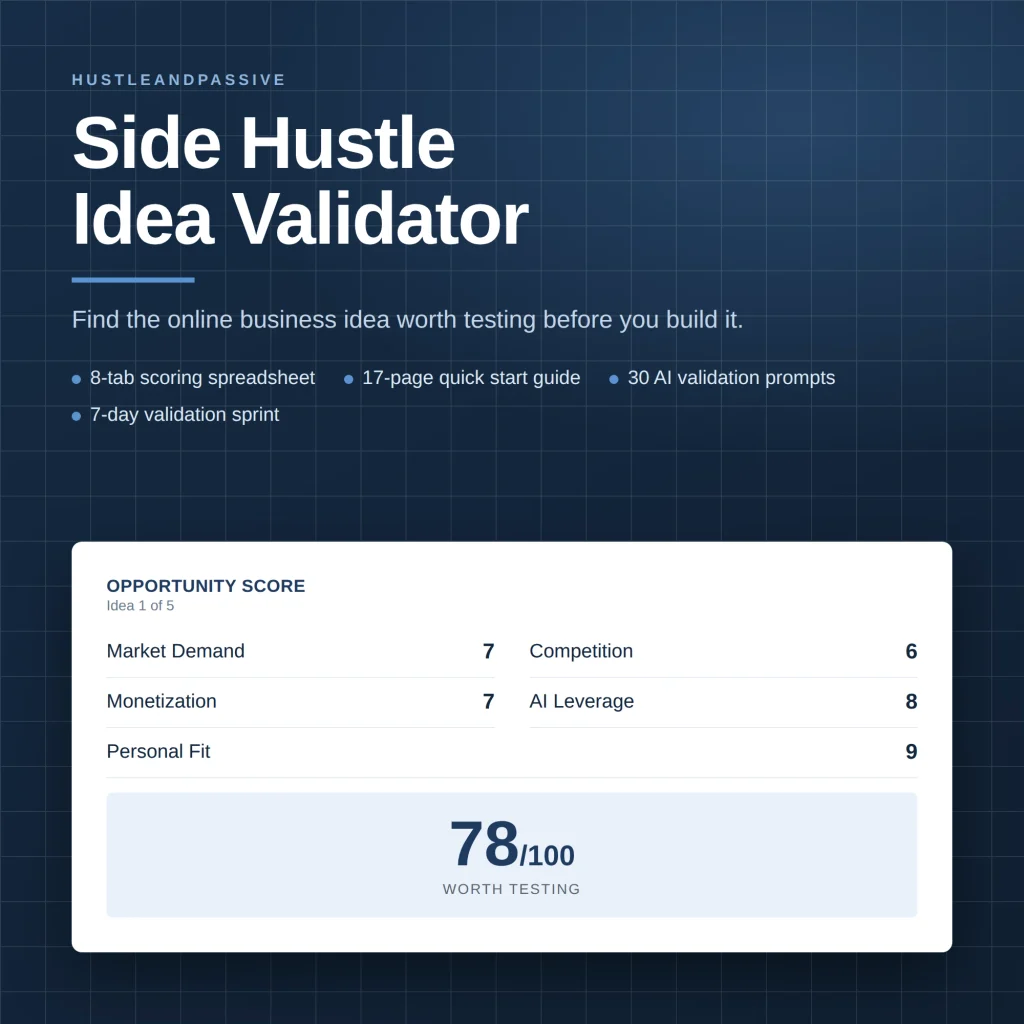
My Side Hustle Idea Validator is a spreadsheet that scores an idea on eight weighted criteria, including market demand, competition and startup cost, and gives you a build, modify or kill call. It won’t predict sales; it tells you which idea deserves your weekend.
How to Combine AI Tools for Digital Products Into One Workflow
A stellar list of tools only helps if you have a system that strings them together:
- Brainstorm & outline with ChatGPT, Claude, or Jasper; pair with Surfer SEO or Keysearch if the output needs to rank.
- Draft the content in your writing tool of choice, reading thoroughly for accuracy before moving on.
- Design visuals in Midjourney, DALL·E, or Canva, or script a video in Synthesia or Higgsfield if that’s the format.
- Edit & polish with Descript for audio/video, Grammarly for text, Murf AI or ElevenLabs for any voiceover needs.
- Optimize the final draft in Surfer SEO or Frase.io.
- Publish & promote on your platform of choice, then repurpose into short-form video with Lumen5 or Higgsfield.
- Track & automate with HubSpot or Zapier, and feed everything into your Kit list.
Each tool handles one specific role. The system is what keeps the output from feeling disjointed.
Example: An AI Tool Stack for a Course Launch
Here is how the tools fit together on one realistic project: a personal-finance course for freelancers. Keysearch or Surfer SEO finds the search terms the sales page should target, such as “financial planning for freelancers”. Claude or Jasper outlines each lesson, and the creator adds their own expertise. Midjourney or Canva produces a consistent set of brand visuals. Synthesia turns a script into a short sales video, and ElevenLabs or Murf AI voices the intro clips.
How much time this saves depends on your skills and the size of the course. The gain comes from not doing design, video and voice work by hand, not from skipping the expertise only you can add.
What’s Changed for 2026
Three real shifts happened this year, and none of them are just incremental version bumps.
AI video reshuffled hard. OpenAI shut down the consumer Sora app on April 26, 2026, and API access closes on September 24, 2026. If you built anything around Sora, most creators migrated to Google’s Veo 3.1 or ByteDance’s Seedance 2.0, or sidestepped the choice entirely with an aggregator like Higgsfield that hosts several models under one subscription. A video tool you’re using shutting down mid-project is now a real risk to plan around, not a hypothetical.
Agentic AI is the actual industry direction, not just a buzzword, though I’d take the loudest claims with a grain of salt. The shift is from “type a prompt, get a draft” toward tools that plan, execute, and check multi-step work with less hand-holding. Jasper, Copy.ai, and Zapier have all added agent-style modes this year. It’s worth watching, but I’d treat “fully autonomous content agent” marketing skeptically for now. A solo side hustle is usually better served by a human reviewing every step than by full autonomy, and it’s an open secret in the industry that a lot of these agentic projects get quietly shelved a few months in once the ROI doesn’t hold up.
SEO is splitting into SEO and GEO. Ranking on Google still matters, but a growing share of searches now get answered directly inside ChatGPT, Perplexity, and Google’s AI Overviews, no click required. A couple of the SEO tools above (Surfer SEO, SEMrush) have started layering AI-answer visibility tracking on top of traditional rank tracking. Practically, that means writing content clear and well-structured enough for an AI to cite cleanly is becoming as relevant as writing for a human skimmer. Not a replacement for SEO. An addition to it.
If you want to use these tools without showing your face, see our guide to the faceless AI side hustle, including YouTube’s monetization rules for AI content.
Frequently Asked Questions
Can I use multiple AI tools at once?
Yes, that’s the norm, not the exception. Most people on this list are using a writing tool, a design tool, and an editing tool together, not relying on one to do everything.
What’s the best AI tool for a total beginner?
ChatGPT or Claude, both free to start, flexible, and no real learning curve. Canva is the equivalent starting point on the design side.
Are AI tools reliable for factual information?
Not fully. They’re strong at generating structure and drafts, weaker at getting niche facts exactly right. Always fact-check anything specific before it goes live.
What are the hidden costs to watch for?
Usage caps, premium-feature paywalls, and per-seat pricing are the most common surprises. Read the pricing page before committing, not after your card is charged.
Do I need to disclose AI use to my audience?
There’s no legal requirement in most jurisdictions to disclose AI-assisted content. In practice, being upfront about your process tends to build more trust than it costs.
Is it worth building a workflow around a single AI tool?
Less than it used to be. This year’s Sora shutdown is the clearest example: a single-model dependency can disappear with a few months’ notice. Where a genuine alternative or aggregator exists (like Higgsfield for video), it’s worth the small extra setup cost as insurance.
Final Recommendation
If you read nothing else on this page: the two AI tools for digital products to start with are Canva and ChatGPT (or Claude). That combination is free to start, covers writing and design, which is most of what a new digital product actually needs, and neither one has a learning curve measured in weeks.
Add Keysearch once you’re publishing regularly and want to know what’s actually worth writing about next. Add Kit the day you get your first 10 subscribers, not after you hit 1,000. The list is what turns one product into a business instead of a one-time launch. Everything else on this page solves a specific bottleneck; it’s not a starting point.
Action Steps & Conclusion
You don’t need all 26 of these tools. You need the two or three that solve your actual bottleneck this month.
- Pick your biggest pain point, writing, design, or video, and start there.
- Try one tool, not five, so you can actually tell if it’s working.
- Set a real metric (“cut writing time by 50%”) instead of a vague goal.
- Add tools gradually as your workflow proves out, tracking ROI before upgrading tiers.
None of this replaces the human part: the idea, the taste, the audience relationship. It just removes the busywork standing between you and shipping. If you’re ready to put a full stack together, the AI creator tech stack breaks down exactly which tools pair well together.
If you want a step by step system for the whole build, I put one together in my AI Digital Product Builder: a workbook, a guide and 40 prompts. It is my own product, so take that into account.
Sources & Further Reading

Writes and tests every guide on hustle&passive. Everything here is something we have actually run — including the parts that did not work.