Disclosure: some links in this guide are affiliate links, so I may earn a commission if you buy through them, at no extra cost to you. Last updated: October 2026. Every free-plan limit below was checked on the tool’s own pricing page.
“Free” means very different things in AI tools. Some free plans are generous enough to run a side hustle on. Others give you a taste, then lock the feature you actually need, or quietly ban commercial use. This list of the best free AI tools covers what each free plan really includes, where it stops, and when paying starts to make sense.
I picked these for people building side income: writing, design, presentations, voice, video and transcription. I use Claude every week to research and draft for this site, and every limit below comes from the tool’s own pricing page, checked in October 2026.
Key Takeaways
- The best free AI tools for most people are ChatGPT, Claude and Gemini. All three have free plans strong enough for daily writing and research.
- Check commercial rights before you sell anything. ElevenLabs’ free plan doesn’t allow commercial use; Ideogram’s free plan does, but your images are public.
- Free plans are capped, not crippled. Canva Free gives you up to 20 AI uses a month, Grammarly Free gives you 100 AI prompts a month, and Otter.ai gives you 300 transcription minutes.
- Upgrade one tool at a time, and only when a free limit is costing you real work or money.
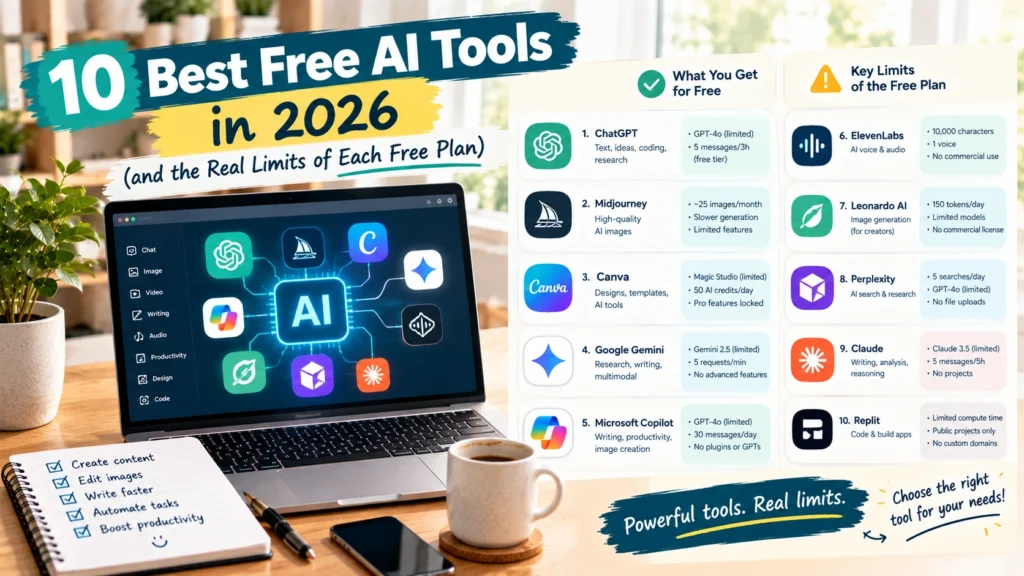
The Best Free AI Tools at a Glance
| Tool | Best for | Free plan limit | Main catch |
|---|---|---|---|
| ChatGPT | Writing, brainstorming | Unlimited text chats | Uploads, images and deep research are limited |
| Claude | Long writing, research | Chat, web search, files and code | Usage limits; Pro raises them |
| Gemini | Research, Google users | Flash model, 15 GB storage | Access to the Pro model varies |
| Canva | Design, templates | Up to 20 AI uses a month | Premium elements need Pro |
| Grammarly | Editing | 100 AI prompts a month | Rewrites and tone tools need Pro |
| Gamma | Presentations | Up to 10 slides per prompt | Bigger decks need a paid plan |
| Ideogram | Images with text | Weekly credits for eligible accounts | Free images are public |
| ElevenLabs | AI voice | 10,000 credits a month | No commercial license |
| Otter.ai | Transcription | 300 minutes a month | 30-minute cap per conversation |
| Descript | Video and podcast editing | 60 media minutes a month | 720p exports with a watermark |
Limits come from each tool’s pricing page in October 2026. Before you sell anything you make with a free plan, read that tool’s current terms of use.
Best Free AI Tools for Writing and Research
1. ChatGPT
ChatGPT’s free plan includes unlimited text chats, plus limited file uploads, image creation, voice chats and deep research (ChatGPT pricing). For a side hustler, that covers drafting emails, outlining articles, brainstorming product ideas and rewriting descriptions.
The free plan runs out on the heavier features first: uploads, images and deep research. If you upload documents every day, that’s where you’ll feel the limit. Our guide to making money with ChatGPT shows the side hustles that work well on the free plan.
2. Claude
Claude’s free plan lets you chat on web, desktop and mobile, search the web, create files, run code, and keep memory across conversations (Claude pricing). It’s especially good at long, careful writing and at working through documents you paste in.
From my own work: Claude is the assistant I use most for this site. It’s my research and first-draft partner; I still check every fact and rewrite in my own voice. Pro costs $20 a month ($17 a month billed yearly), and I’d only upgrade once you’re hitting the free usage limit regularly.
3. Gemini
Gemini’s free app includes the Flash model, varying access to the Pro model, image generation, Deep Research, Gemini Live and Canvas, plus 15 GB of Google storage (Google AI plans). If you live in Gmail and Google Docs, it’s the most convenient free AI tool on this list. Google AI Pro costs $19.99 a month and offers 4x higher usage limits.
Best Free AI Tools for Design and Content
4. Canva
Canva Free gives you up to 20 Standard or Premium AI uses a month, including tools like Magic Layers and Style Match (Canva pricing). That’s enough to design social posts, pins and simple digital products. Canva Pro costs $144 a year and gives you 10 times more AI uses, plus premium elements.
If you want to sell what you make in Canva, read Canva’s licensing rules first; our guide on how to sell Canva templates explains them.
5. Grammarly
Grammarly Free checks spelling and grammar, shows your tone, and includes 100 AI prompts a month for generating text (Grammarly plans). It’s a quiet but useful free AI tool for anyone who writes for clients. Grammarly Pro costs $12 a month and adds sentence rewrites, tone adjustment, plagiarism detection and 2,000 AI prompts a month.
6. Gamma
Gamma’s free plan creates presentations, documents, simple websites, social posts and images, with up to 10 slides per prompt. You can import PDF and PowerPoint files and export to PDF, PowerPoint, PNG or Google Slides (Gamma pricing). It’s a fast way to build pitch decks, lead magnets and course slides without design skills.
7. Ideogram
Ideogram is one of the best free AI tools for images that need readable text, like quotes, posters and thumbnails. Eligible free accounts get weekly credits when they sign in with Google, Apple or Microsoft, though the amount can vary (Ideogram pricing). Ideogram says you can use your images for any purpose, including commercial use, but free images aren’t private: private generation needs a paid plan.
Before you sell AI images, check the legal side in our guide to AI content legal rights.
Best Free AI Tools for Audio and Video
8. ElevenLabs
ElevenLabs is the voice tool most faceless creators use, and its free plan gives you 10,000 credits a month. The catch: the free plan doesn’t include a commercial license. The first paid plan, Starter, is the first one that does (ElevenLabs pricing). Use the free plan to test voices, then upgrade to ElevenLabs Starter before you publish monetized videos.
Our faceless AI side hustle guide covers the full setup.
9. Otter.ai
Otter.ai’s free Basic plan gives you 300 transcription minutes a month, with a 30-minute cap per conversation and 3 lifetime file imports (Otter.ai pricing). It’s useful for transcribing client calls, interviews and your own voice notes, which you can then turn into articles.
10. Descript
Descript’s free plan includes 60 minutes of media processing a month and 100 one-time AI credits, but exports are capped at 720p and carry a watermark (Descript pricing). It’s great for learning text-based video editing. For anything you publish, the watermark means you’ll need a paid plan.
How to Choose the Best Free AI Tools for You
Start with the job, not the tool. Most side hustlers only need three free AI tools to begin:
- One chat assistant (ChatGPT, Claude or Gemini) for writing, research and ideas
- One design tool (Canva or Gamma) for visuals, products and presentations
- One specialist tool for your hustle: ElevenLabs for voiceovers, Otter.ai for transcripts, or Ideogram for images
That stack costs nothing and covers most of the ways to make money with AI we compare in our main guide.
When Should You Upgrade to a Paid AI Tool?
Even the best free AI tools hit a ceiling. Upgrade when a free limit costs you more than the subscription. Three signs it’s time:
- You hit the same limit every week, and it slows down paid work
- You need commercial rights the free plan doesn’t include, as with ElevenLabs
- You need clean output, like Descript exports without a watermark
Upgrade one tool at a time and cancel what you don’t use. Our comparison of free vs paid AI tools goes deeper on when each upgrade pays for itself, and our list of AI tools for digital products covers the paid tools worth it for product creators.
FAQ
What is the best free AI tool?
For most people, the best free AI tool is a chat assistant: ChatGPT, Claude or Gemini. All three offer free plans strong enough for daily writing, research and brainstorming. ChatGPT includes unlimited text chats, Claude adds web search and file creation, and Gemini works best if you already use Google apps.
Are free AI tools really free?
Yes, but with limits. Free plans cap usage, such as Canva’s 20 AI uses a month or Otter.ai’s 300 transcription minutes, and some restrict commercial use. ElevenLabs’ free plan, for example, doesn’t include a commercial license. Check each tool’s pricing page and terms before you rely on it for paid work.
Can I use free AI tools for commercial use?
Often, but not always. Ideogram allows commercial use of free images, though they’re public. ElevenLabs’ free plan doesn’t include a commercial license, and Descript’s free exports carry a watermark. Always read the tool’s current terms before you sell anything you create with it.
Which free AI tools are best for side hustles?
A good free starter stack is one chat assistant (ChatGPT, Claude or Gemini), one design tool (Canva or Gamma), and one specialist tool for your hustle, such as ElevenLabs for voiceovers or Otter.ai for transcription. Together they cover writing, design and content creation at no cost.
The Bottom Line
The best free AI tools in 2026 are good enough to start a side hustle without spending anything. Pick one chat assistant, one design tool and one specialist tool, learn them well, and watch two things: the usage limits and the commercial-use rules. Pay only when a limit is clearly costing you work or money.
If you’re still deciding what to build with these tools, start with our guide to the best ways to make money with AI.

Writes and tests every guide on hustle&passive. Everything here is something we have actually run — including the parts that did not work.