Some links on hustle&passive may be affiliate links. If you purchase through one of these links, we may earn a commission at no additional cost to you. Affiliate Disclosure
Last updated: November 2026. Limits checked on Hostinger’s help pages.
I sent my newsletter from a Hostinger mailbox. Then four batches in a row bounced.
The error was “451 4.7.1 Ratelimit exceeded.” Nothing was wrong with my list. I had used up my daily allowance.
This guide covers the real Hostinger email limits, what counts toward them, and how to send a small newsletter without hitting the wall. It’s for you if you run a blog or a small business and use a Hostinger mailbox for more than one-to-one messages. The limits come from Hostinger’s own help pages. The story is what happened on my mailbox.
Setting up a blog on Hostinger first? Start with our guide on how to start a niche blog and come back here when you’re ready to email your readers.
Key Takeaways
- The Hostinger email limits on the free mailbox that comes with hosting are 100 messages a day. Business Starter allows 1,000, and Business Standard and Premium allow 3,000.
- The limit is per mailbox and runs over a rolling 24 hours. There is no midnight reset.
- One message can go to 100 recipients at most (To, Cc and Bcc together). Separately, in my case every Bcc recipient counted toward the daily total.
- A 451 error is a temporary refusal, not a bad address. Wait, then send less.
- Hostinger emails you when you hit the cap, but it does not stop you at once. Sending continues at a reduced rate, so check your inbox for bounces.
- A mailbox can send a small newsletter, but you have to babysit it. Past a few dozen people, a newsletter tool is easier.
What Are the Hostinger Email Limits?
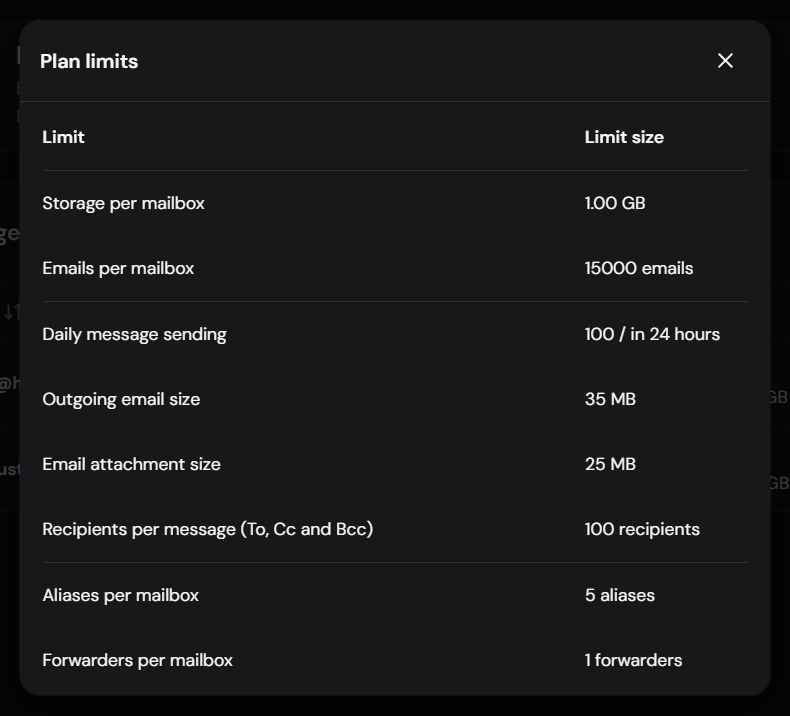
Hostinger email limits exist so the system stays healthy and accounts stay safe. This is what its help page listed when I checked in November 2026.
| Mailbox type | Messages per day |
|---|---|
| Free Business Starter (hosting plan trial) | 100 |
| Business Starter | 1,000 |
| Business Standard | 3,000 |
| Business Premium | 3,000 |
Three details matter more than the table:
- Hostinger email limits are per mailbox, not per domain. A second mailbox gets its own allowance.
- The Hostinger email sending limit runs over a rolling 24 hours. Capacity comes back gradually, not at midnight.
- Hostinger can change the numbers. Its page says the Emails section of hPanel always shows the current limits for your plan.
The same page says the daily figure covers sent and received mail separately. A limit of 100 means up to 100 sent and up to 100 received. If your plan uses cPanel email instead, the rules are different. Hostinger lists its cPanel email limits on a separate page, with caps per hosting plan.
What Happened When I Sent My Newsletter
On 15 November I sent my newsletter to my subscriber list from contact@hustleandpassive.com. There were 81 recipients. I sent the first address alone, then the rest in batches of about 20, all in Bcc so nobody could see anyone else’s address.
The plain text version went out fine. Then I wanted to resend it in my branded template. All four batches bounced with the same error: 451 4.7.1 Ratelimit exceeded.
The next afternoon, a batch of 20 went through without a problem under the same Hostinger email limits. The 24-hour window had moved on.
The math explains it. The first send used 81 of my 100 messages. The second attempt needed 81 more. I also send a short welcome series from the same mailbox, and those messages count too.
It happened again on 21 November. I sent a newsletter to about 98 people, plus 6 welcome emails. That made 104 messages in one day. Around 48 recipients got the same 451 bounce, and Hostinger sent the same limit notice. The bounced addresses were fine. They simply arrived after the cap.
Hostinger also sent me an email titled “Email sending limits reached.” It said I had hit the allowed 100 emails per day on my account, that I could still send at a reduced rate, and that full capacity comes back once the 24-hour window passes. It arrived seconds after the first bounces. I got the same notice again on 21 November.
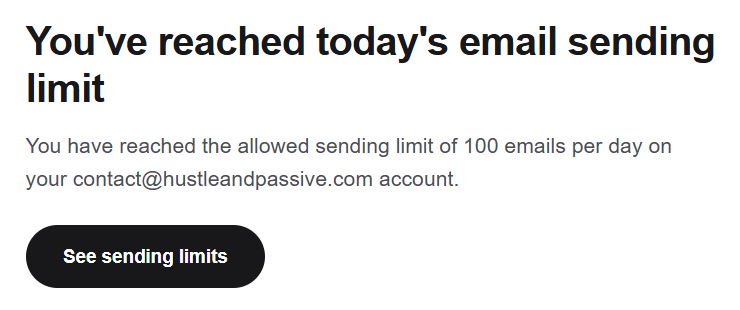
One honest note. Hostinger’s help pages don’t show that exact error code. I’m describing what the bounce messages in my own inbox said, not quoting their documentation. Each one listed every recipient of that batch with the same line: 451 4.7.1 Ratelimit exceeded for sender.
Does Each Bcc Recipient Count Toward Hostinger Email Limits?
In my case, yes. Eighty-one recipients behaved like eighty-one emails against the daily cap. Hostinger’s page doesn’t spell this out, so check your own count before a big send.
Hostinger does cap recipients per message at 100, counting To, Cc and Bcc together. That’s a separate rule from the daily total.
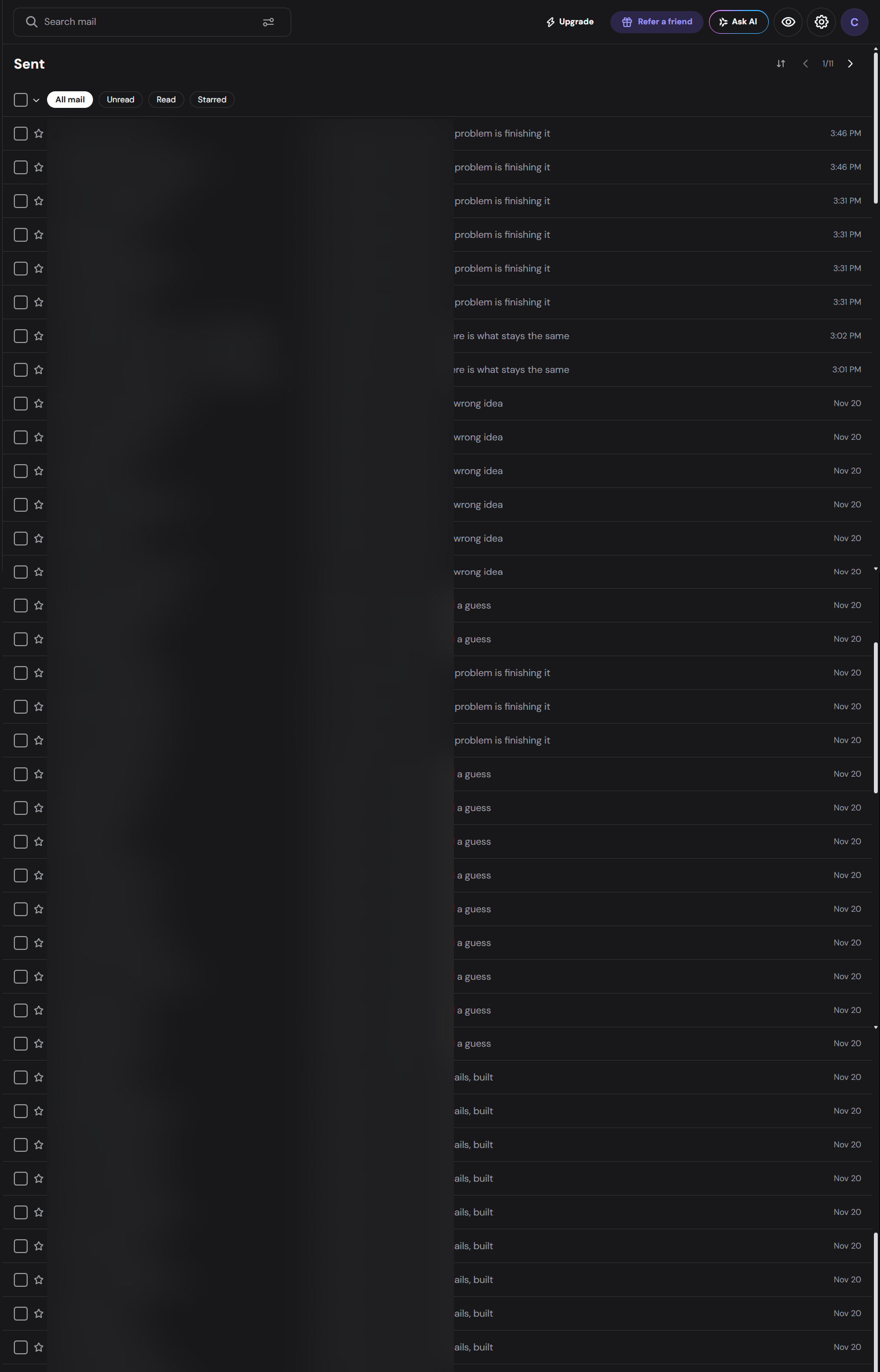
Look at the Sent folder of the same mailbox. On 20 November alone it holds about 30 messages, mostly my welcome series. Every one of them counts against the same 100.
A Sent Message Isn’t a Delivered Message
My sends were accepted at first. The bounces showed up afterwards in my inbox, with subjects like “Undelivered Mail Returned to Sender.” So after any batch, open your inbox and look. Don’t trust the first confirmation.
The Sent folder can mislead you too. On 21 November it showed messages sent after the limit notice had already arrived. A message in Sent only proves your mail client handed it over. It proves nothing about delivery.
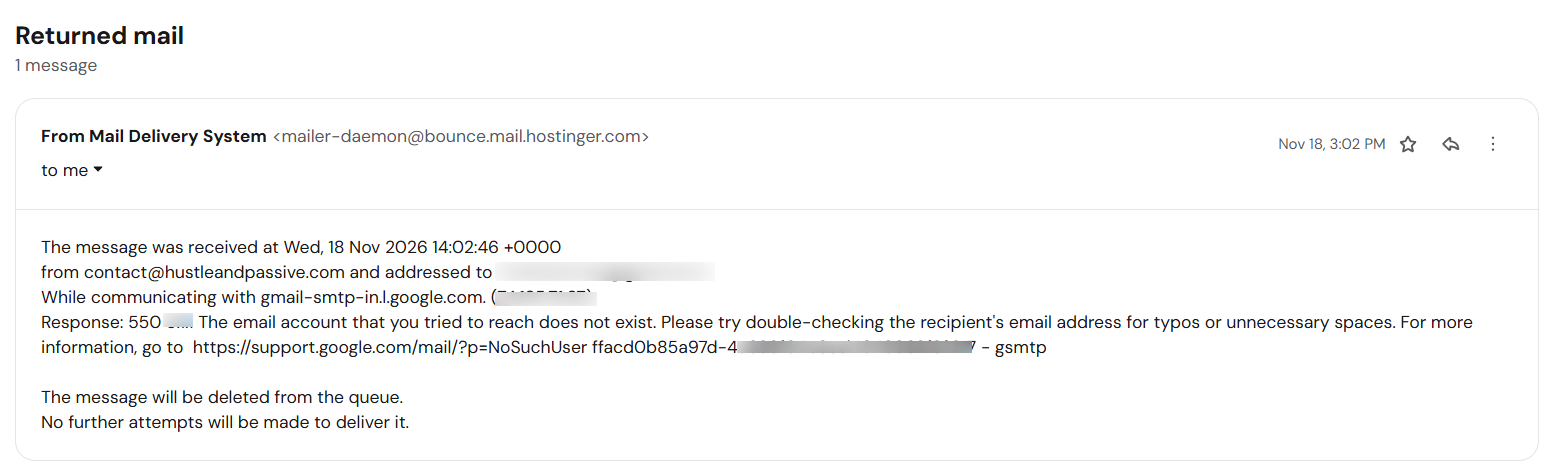
Not every bounce means the same thing. A 451 is temporary, and the same address works later. A 550 “no such user” bounce, like the one I got from a Gmail address on 18 November, is permanent. That address does not exist. Remove it from your list.
What to Do If You Already Hit the Limit
If the notice has already arrived, stay calm. Nothing is broken, and the Hostinger email limits reset by themselves. Here is the order I would follow:
- Stop sending. Every new message adds to the count and makes the window longer.
- Open your inbox and read the bounces. Each “Undelivered Mail Returned to Sender” message lists exactly who did not get your email.
- Split the list. People who bounced with a 451 are valid. People who bounced with a 550 are not, so remove them.
- Wait for the rolling 24 hours. Capacity returns gradually, so wait until the afternoon after your last big batch.
- Resend only to the people who bounced, in a smaller batch than before.
How to Avoid the 451 Error
- Count before you send. Add up everything the mailbox sent in the last 24 hours, including automatic emails.
- Leave room under the Hostinger email limits. On a 100-a-day mailbox, I’d keep one batch to 60 or 70 messages.
- Split big sends across days. Send half today and half tomorrow.
- Check for bounces after each batch. Remove addresses that bounce for real, such as dead addresses or full mailboxes.
- Don’t resend everything after a partial failure. Work out who actually received it first.
- Check hPanel before you start. The Hostinger email limits for your plan may have changed.
Business Email or a Newsletter Tool?
If you keep hitting the Hostinger email sending limit, there are two ways out. They solve different problems.
Business Email raises your Hostinger email limits. Business Starter lists 1,000 messages a day per mailbox, ten times the free trial mailbox. If you mostly want a professional inbox with room to breathe, Hostinger Business Email is the simple fix. Check the current price on Hostinger’s page, because promo prices change.
A newsletter tool is built for the job. It handles unsubscribe links, bounces and sending in batches for you. I use Kit for my free guide sign-ups, which keeps that list separate from my business inbox.
My honest take on Hostinger email limits: a mailbox can send a small newsletter, but you babysit it. Past a few dozen people, a newsletter tool saves you the babysitting.
Hostinger Email Limits: FAQ
How many emails can I send per day with Hostinger?
It depends on the plan, and the limit is per mailbox. Hostinger’s help page lists 100 a day for the free trial mailbox, 1,000 for Business Starter, and 3,000 for Business Standard and Premium. Check hPanel for your current numbers.
Does the Hostinger email limit reset at midnight?
No. Hostinger applies the daily limit over a rolling 24-hour period, so capacity comes back gradually as older messages age out.
Can I raise my Hostinger email limit?
Hostinger’s page says email limits are fixed per plan. The practical fix is moving to a bigger plan, such as Business Starter or higher.
What does 451 4.7.1 Ratelimit exceeded mean?
It’s a temporary error code, which means you can try again later. On my Hostinger mailbox it appeared after I went over the daily cap. Wait, send fewer messages, then retry.
What happens when I reach the Hostinger email limit?
Hostinger sends you an email saying the limit is reached. Sending continues at a reduced rate, and some messages can bounce with a 451 error. Full capacity returns once the 24-hour window passes.
Sources: Hostinger’s help pages, Parameters and limits of Hostinger Email and Parameters and limits of Hostinger cPanel Email, read in November 2026.

I am a geotechnical engineer and I write every guide on hustle&passive. I check pay, fees and rules on official pages, and when I have not tried something myself, I say so and cite my sources.